Bila UiTM Cuti
Bila UiTM Cuti academic calendar and Find My Internship — what ships on bilauitmcuti.com and the design system both features share.
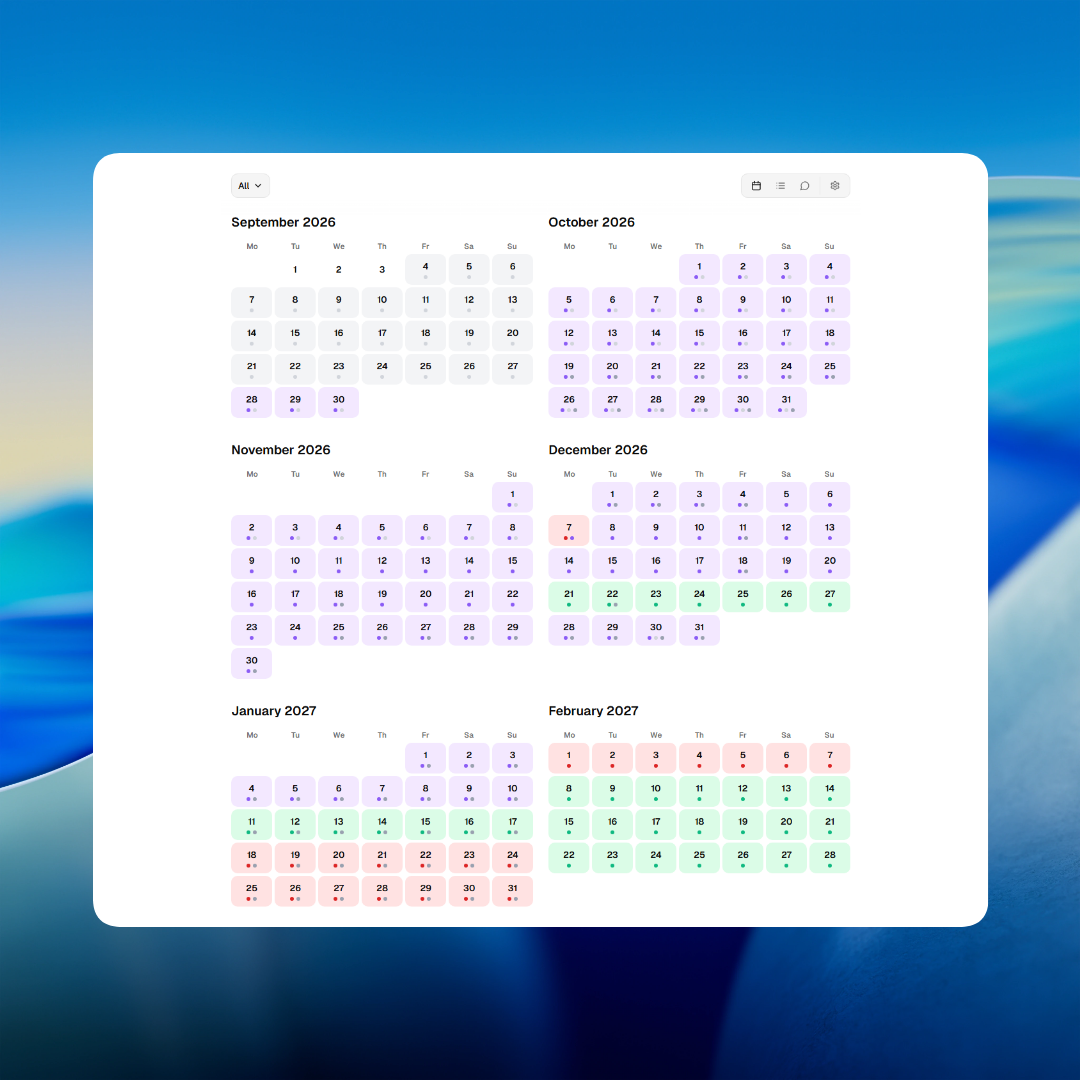
Every semester, UiTM students ask the same question: bila cuti? Bila UiTM Cuti is a student-focused web app for checking UiTM academic calendar timelines — plus Find My Internship on the same domain. See bilauitmcuti.com/about for what ships today.
The Problem
Official UiTM schedule information is hard to use on a phone: static PDFs, portal pages, and sources that do not always agree. Bila UiTM Cuti started from that gap.
Academic calendar
- UiTM's academic calendar is published as PDFs or buried in portal pages — not mobile-friendly, not searchable, easy to misread.
- Students are split into Group A and Group B, each with a different calendar. Many check the wrong group and get the wrong cuti date.
- There was no single fast place to see registration, lectures, examinations, and semester breaks together.
Find My Internship
- Internship listings for Malaysian students sit across many company career pages and job portals — no single place to browse.
- Manually searching costs real hours every application season.
- There was no free aggregator on the same site students already used for cuti dates.
The Solution
Two features share bilauitmcuti.com and one design system:
- The academic calendar — timelines for registration, lectures, examinations, and breaks in one student-focused app (about).
- Find My Internship — internship listings browsable at bilauitmcuti.com/internship.
The app is not affiliated with UiTM. Schedule answers are best-effort; students should confirm critical dates with official UiTM announcements.
Academic calendar
Per the about page, the calendar is built for phones, tablets, and desktop with the same experience across views.
What students can use today:
- Grid and list views with activity filters
- Group A and Group B sessions
- Kedah, Kelantan, and Terengganu regional dates filters
- Countdown to the next activity
- Light and dark themes and PWA install
- AI chat (Cloudflare Workers AI, English and Malay) for dates, breaks, exams, and program context based on the selected program
Programs covered include Foundation/Professional, Pre-Diploma, Diploma, Diploma (Part-Time), Bachelor, Bachelor (Part-Time), Master, and PhD.
The assistant explains schedule context from the student's selected program. Answers may be incomplete or outdated — the product copy is explicit that critical dates must be verified with official UiTM sources.
Find My Internship
Find My Internship lives at bilauitmcuti.com/internship — on the same domain as the calendar so students do not need a separate site or account.
The board surfaces internship openings gathered from job portals and company pages — duration, stipend range, and source shown per listing — so students can browse and load more in one place instead of opening dozens of tabs each application season.
One design system for both features
The academic calendar and Find My Internship look and behave like one product because they share a single design system — the same semantic tokens, typography, components, and dark-mode treatment on bilauitmcuti.com and bilauitmcuti.com/internship.
That was intentional. Students should not feel a visual jump between the calendar grid and the internship board. The sections below document how that system works in production.
Stack
The stack below is what powers the calendar, internship board, and shared UI — one Tailwind + shadcn foundation.
Framework
Next.js App Router + React 19
Styling
Tailwind CSS v4 (@import 'tailwindcss')
Component primitives
shadcn/ui — radix-vega preset
Radix UI
Dialog, Select, Popover, Tooltip, etc.
Icons
Lucide React
Theming
next-themes (class-based light / dark)
Fonts
Geist Sans
Geist Mono
Utilities
cn() — clsx + tailwind-merge
Meaning lives in the name, not the hex code
The temptation early on is to hardcode light and dark shell colours in every layout file. It works until you want to nudge the dark-mode card colour and end up hunting through a dozen components.
Instead, every surface asks a role question, not a colour question: is this a card, a popover, or muted helper text? The colour is decided once, centrally, and each component declares what it is and inherits how that currently looks.
The system should know what something is before it knows what it looks like — that is what makes a full theme flip feel instant instead of patchy.
Layer 1
CSS custom properties
:root / .dark
Layer 2
@theme inline
--color-* bridge
Layer 3
Tailwind utilities
bg-background, rounded-lg
Where each format lives
- Token flow: CSS custom properties (:root / .dark) → @theme inline { --color-* } → Tailwind utilities (bg-background, text-muted-foreground).
- Add new tokens in app/globals.css, bridge in @theme inline, then use as Tailwind utilities.
- Domain colours extend lib/calendar-activity-colors.ts or lib/data.ts — never scatter hex in components.
- Activity colour map is shared by grid-view.tsx, calendar-header.tsx, and the legend (previously duplicated).
Token previews follow the site theme. Press D to toggle light/dark.
Background
bg-background
Page / app shell
Foreground
text-foreground
Primary text
Card
bg-card
Card surfaces
Card foreground
text-card-foreground
Card text
Popover
bg-popover
Popovers, menus, tooltips shell
Popover foreground
text-popover-foreground
Popover text
Primary
bg-primary
Primary actions, dark-mode toggle track
Primary foreground
text-primary-foreground
Text on primary
Secondary
bg-secondary
Secondary surfaces, chips
Secondary foreground
text-secondary-foreground
Text on secondary
Muted
bg-muted
Subtle backgrounds
Muted foreground
text-muted-foreground
Secondary / helper text
Accent
bg-accent
Hover / focus fills
Accent foreground
text-accent-foreground
Text on accent
Destructive
bg-destructive, text-destructive
Errors, destructive actions
Border
border-border
Borders
Input
border-input, bg-input/30
Form fields
Ring
ring-ring
Focus rings (ring-3 ring-ring/50)
Surface elevated
bg-surface-elevated
Elevated dark-mode surfaces
Chart 1
bg-chart-1
Admin — page views
Chart 2
bg-chart-2
Admin — unique visitors
Chart 3
bg-chart-3
Internship submissions
Chart 4
bg-chart-4
Bounce rate
Chart 5
bg-chart-5
Reserved / future
Light shell
#ffffff
Dark shell
#1a1a1a
Elevated dark surface
#2A2A2A
Dark mode is a parallel design, not an inversion
A lot of side projects add dark mode by inverting colors and calling it done. Here, light and dark are two completely, deliberately designed states — which is why the core palette uses OKLCH rather than plain hex. OKLCH describes color the way the eye perceives lightness, so a card that feels one step lighter than the background in light mode still feels like one consistent step in dark mode.
There is also a small but deliberate detail: before React even hydrates, the page already knows whether to paint white-on-dark-text or dark-on-white-text. Nobody should see a flash of the wrong theme — that flicker is a tiny trust violation, and trust is the whole product for a tool students rely on daily.
Theme preview follows the site toggle. Switch is instant with no colour fade.
Next break
Mid-semester
12 days left
- Two modes only: light (default) and dark — enableSystem: false.
- Theme stored in localStorage key theme; class toggled on html.
- PWA theme-color follows shell pair (#ffffff light, #1a1a1a dark), synced by theme-toggle.tsx.
- @custom-variant dark (&:is(.dark *)); and standalone (@media (display-mode: standalone)) for PWA header tweaks.
- Transitions disabled globally on theme/color changes — instant switch.
Color is a language for the calendar, not decoration
The calendar grid uses four core colours — gray, purple, red, and green — chosen to be read in half a second, the way you glance at a traffic light.
| Activity | Colour | Reads as |
|---|---|---|
| Registration | Gray | Neutral, administrative |
| Lecture | Purple | Teaching — also the brand colour in the logotype |
| Examination | Red | The one accent allowed to feel tense |
| Break | Green | The only one allowed to feel good |
Amber for school holidays and muted gray-violet for weekends required a hierarchy call — a weekend during exam week should still read as exam week first. Program badges use the same pattern at lower intensity: each program keeps a consistent hue so students can pattern-match before reading the label.
Title accent in the live app
Bila UiTM Cuti
Registration
#d1d5db
Lecture
#8b5cf6
Examination
#dc2626
Break
#10b981
School Holiday
#f59e0b
Weekend
#71717a
Program badges in list view
In the app: bg-[colour]/10 with matching text, plus dark-mode variants per program.
Elevation is a ladder, not a one-off color
Surfaces stack: background, then card, then an elevated layer for chat bubbles and calendar overlays. The fix was naming the elevated dark surface instead of repeating the same hex in three places — a named token survives a redesign; a copy-pasted value does not.
Cards use the largest radius in daily UI; buttons and inputs sit one step smaller. The base radius is 10px and everything else scales from there.
Base
rounded-lg
Default reference
Small
rounded-sm
Medium
rounded-md
Buttons, inputs
Large
rounded-lg
XL
rounded-xl
Cards
2XL
rounded-2xl
3XL
rounded-3xl
4XL
rounded-4xl
Badges
Restraint in motion
Transitions are disabled globally on purpose. Theme and colour switches happen instantly — no fade, no cross-dissolve. The only places motion survives are small, functional moments:
- Hover opacity shift on controls
- Toggle sliding
- Chat header sliding in
Motion is a cost that has to earn its place. Typography follows the same logic — one scale, used consistently rather than ad hoc sizes per component.
Calendar hero title
Geist Sanstext-5xl font-semibold tracking-tightSemester 1 2025/2026
lib/calendar-title-styles.ts
Card title
Geist Sansfont-heading text-base font-mediumNext break
Body / UI
Geist Sanstext-smForms, chat, and controls — default 14px
Muted copy
Geist Sanstext-muted-foregroundDays until mid-semester break
Tooltips
Geist Sanstext-xsTap to view full calendar
Chat input
Geist Sanstext-smAsk when the next break is…
Below 16px-equivalent can trigger iOS zoom-on-focus
Chat header
transform/translate transition 300ms — the one deliberate motion exception.
Nav hover
Foreground colour on hover, desktop only (@media (hover: hover)).
Control hover
Most controls use opacity-only transitions (100ms).
Gradient fades
24px fades using var(--background) on .chat-input-area::before, .chat-top-fade, .calendar-controls-fade, and .suggestions-fade-left/-right.
Responsive shell
.responsive-shell-bg forces white in light mode, var(--popover) in dark.
Theme switch
Transitions disabled globally on theme/color changes — instant switch, no fade.
Z-index layers
z-[9]Chat / calendar top fadez-35Calendar scroll-restore overlayz-40Calendar controls stickyz-[60]Fixed calendar controls (mobile)z-[9999]Version bannerBorrow structure, keep identity
Buttons, dialogs, badges, and tooltips run on shadcn/ui with a neutral base — Radix already solved accessibility and focus handling for overlays. What stays custom is everything that gives Bila UiTM Cuti its face across both the calendar and Find My Internship:
- The calendar colour language
- The type scale
- The elevated-surface treatment
- The pill-shaped badges
The admin internship views added chart series tokens so page views, unique visitors, and submission counts each keep a consistent colour identity — a glance should tell a story instead of requiring every number to be read individually. Buttons and badges stay on shadcn variants; focus and invalid states are checked against elevated surfaces as well as cards.
Button variants
- default — Primary CTA
- outline — Secondary, bordered
- secondary — Soft filled
- ghost — Icon / toolbar
- destructive — Delete / dangerous
- link — Inline text actions
Badge variants
Focus & invalid states
Shared focus ring: focus-visible:ring-3 ring-ring/50. Invalid fields pick up destructive ring via aria-invalid.
Installed primitives in components/ui/